
Restore click and drag feature in excel- how to restore fill handle

Recently one of my follower asked me, that he can not use the Microsoft Excel 'click & drag' feature to fill column and cells with sequential or related data. He was using excel in built list & custom list  for filling up date, Month & serial numbers.He was struggling and has to enter each data manually.
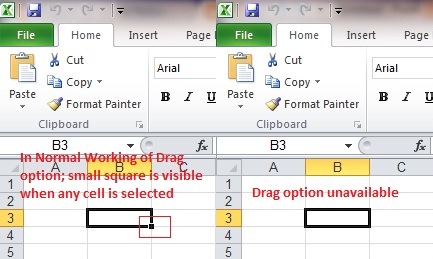
Microsoft Excel click & Drag option


This happens with users who click in Excel setting options without knowledge & forget to restore. This problem caused due to disabling of 'fill handle and cell and drag drop' function.


How to restore fill handle and cell drag and drop function

click on file menu the locate and click option sub menu under that.
Excel Options
Or alternatively you can drop down cusomize quick access toolbar & select more commands


When you do above action Excel option window will open click a advance tab on left side

You will observe that Enable fill handle and cell drag-and-drop option is unchecked; Enable it by checking box as shown also verify Alert before overwriting cells option is also unable which provides you warning before overwriting cell data as mentioned.

That's it you have resolved the problem now you can use drag drop functionality as before.

Comments

Popular posts from this blog

INSTALL CISCO VPN CLIENT ON WINDOWS 10 (32 & 64 BIT). FIX REASON 442

This article shows how correctly install Cisco VPN Client (32 & 64 bit) on Windows 10 (32 & 64 bit) using simple steps, overcome the ‘ This app can’t run on this PC ’ installation error , plus fix the Reason 442: Failed to enable Virtual Adapter error message . The article applies to New Windows 10 installations or Upgrades from earlier Windows versions and all versions before or after Windows 10 build 1511 .  To simplify the article, we’ve broken it into the following two sections: How to Install Cisco VPN client on Windows 10 (clean installation or upgrade from previous Windows), including Windows 10 build prior or after build 1511 . How to Fix Reason 442: Failed to enable Virtual Adapter on Windows 10 Figure 1. The Cisco VPN Client Reason 442: Failed to enable Virtual Adapter error on Windows 10 HOW TO INSTALL CISCO VPN CLIENT ON WINDOWS 10 (NEW INSTALLATIONS OR O/S UPGRADES) The instructions below are for new or clean Windows 10 inst...

Linux File and Directory Permissions

file & directory protection is a essential of any OS and Linux OS is no exception for it! These authorizations allow you to choose exactly who can access your files & directory, providing an overall improved system security. There was one of the major flaws in the older Windows operating-system where, by standard, all users can see each other people's information (Windows 95, 98, Me). For overcoming it, editions of the Windows based computer system such as NT, 2000, XP and 2003 lot more security features added. They fully support file & directory permissions, just as Linux system has since the beginning. Together, we'll now assess a directory listing from our Lab Linux system hosting server, to help us understand the information provided. a simple 'ls' command will give you the file and directory listing within a given directory, including the option  '-l' will display number of new areas that we are going to discuss here:

How to create a Hirens Boot CD 15.2 USB Disk

Hiren’s BootCD (HBCD) is a bootable CD that contains a set of tools that can help users to fix their computer if their system fails to boot. More specifically, HBCD contains hardware diagnostic programs, partition tools, data recovery utilities, antivirus tools and many other tools to fix your computer problems.  I write this article because I use Hiren’s BootCD frequently to troubleshoot computer problems, specially when a computer doesn’t boot anymore due to a virus attack or due to a corrupted file system. In this article you will find instructions on how to put Hiren’s BootCD on a USB flash drive (stick) in order to troubleshoot computer problems in the future.